
Save Any Image as
JPG, PNG, WebP, or AVIF
Right-click any image on the web and instantly save it in your preferred format. 100% local processing - your images never leave your browser.

Everything you need to convert images
Private by design, fast by default.
Privacy First
All conversion runs locally in your browser using the Canvas API. Images never leave your device, and nothing is uploaded to a server.
Nothing Hidden
No affiliate injection, no remote code, no monetization. Every permission is justified in writing, and every server the extension talks to besides the page you are on is named in the privacy policy.
Instant Conversion
Right-click any image and save it in your preferred format. No upload, no wait.
6 Format Options
Convert to JPG, PNG, WebP, AVIF, GIF or PDF. Choose the right format for every use case.
Quality Control
Adjust compression quality for JPG, WebP, and AVIF. Get the perfect file size.
Copy, Not Just Save
Copy the image straight to your clipboard as PNG, ready to paste into a document or a chat without a file landing in Downloads.
Batch Save
Open the toolbar popup to scan the page, tick the images you want, and save them together. Any single one can still go out in its own format.
Or Save the Original
Take the file exactly as the page served it, with no conversion at all. An animated GIF stays animated, an SVG stays vector, a HEIC stays HEIC.
Save Where You Want
Choose a folder once and every save lands there, with no dialog and no digging through Downloads. Nothing about the folder is transmitted.
Capture a Page
Photograph the whole page, the visible part, or a region you drag out, then save it as JPG, PNG, WebP, AVIF or PDF - including a multi-page PDF for a long one.
Cross-Browser
Available for Chrome, Firefox, and Edge. Same experience everywhere.
Built-in Editor
Crop, rotate, and flip an image before you save or copy it, right from the right-click menu, the popup, or your save history. Off by default - turn it on in Settings.
How it works
Three steps, no upload, no signup, no servers.
-
 1
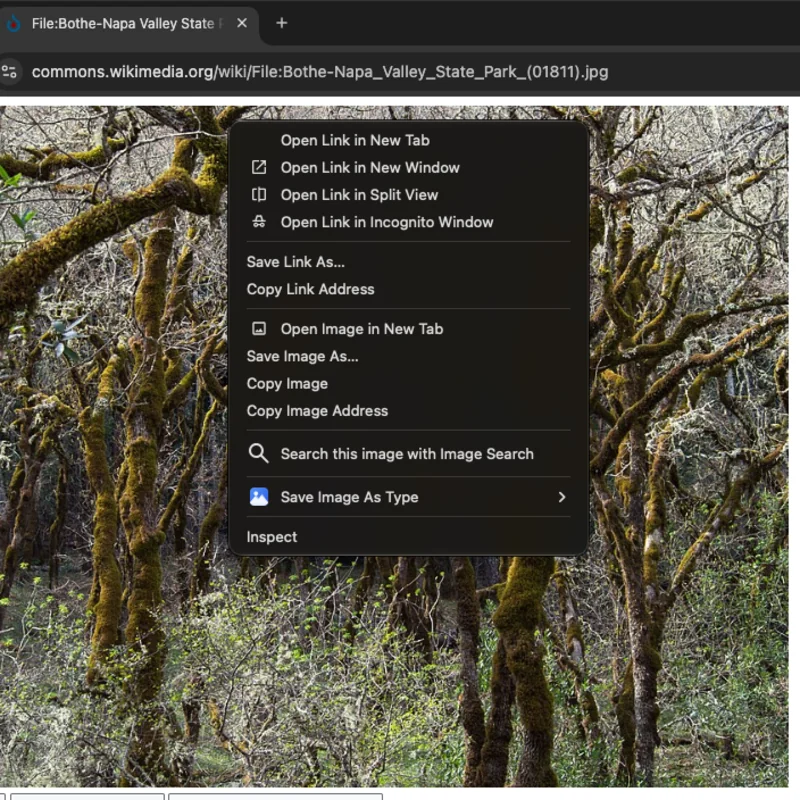
Right-click any image
Find an image on the web and right-click it. "Save Image As Type" sits in the context menu.
-
 2
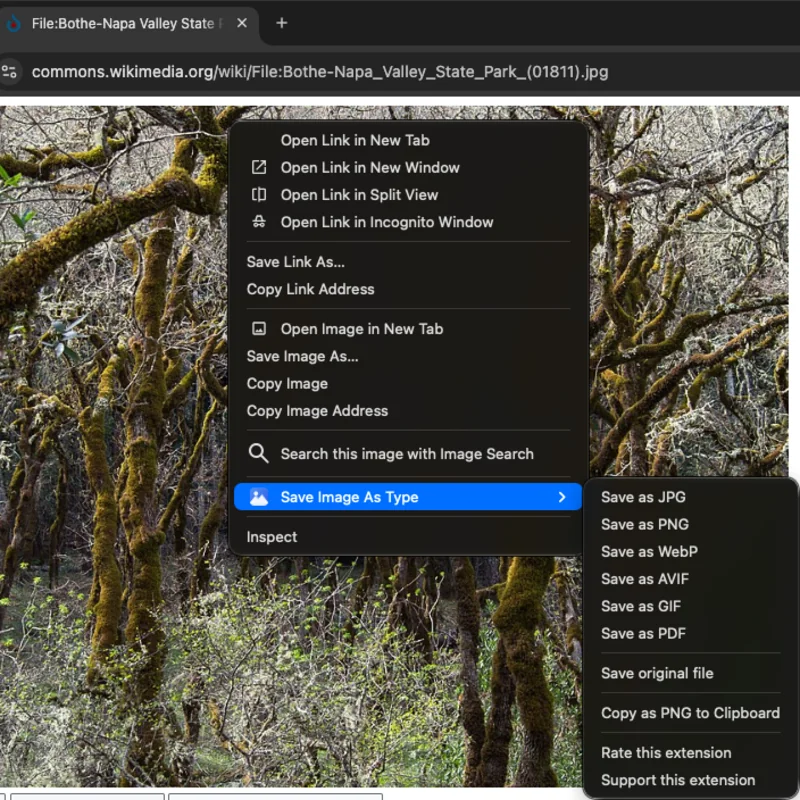
Choose your format
Pick JPG, PNG, WebP, AVIF, GIF or PDF. The image is converted on your device, nothing is uploaded.
-
 3
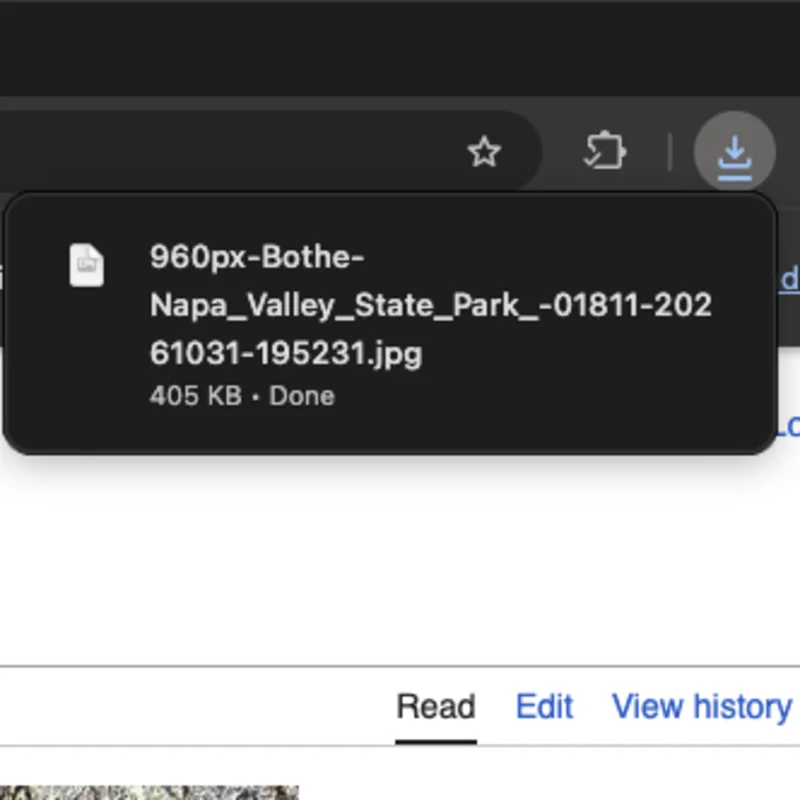
It lands in your folder
The converted file lands in your Downloads folder, ready to use.
Photo in the screenshots: "Bothe-Napa Valley State Park (01811)" by Rhododendrites, CC BY-SA 4.0, via Wikimedia Commons.

Supported formats
Choose the right format for every use case.
JPG
Default: 95%The universal image format. Best for photos and complex images with gradients.
PNG
LosslessLossless format with transparency support. Perfect for screenshots, logos, and graphics.
WebP
Default: 90%Modern format by Google. Smaller file sizes than JPG/PNG with great quality.
AVIF
Default: 50 (libavif scale)Next-gen format with superior compression - around 5x smaller than JPG, but much slower to encode: a large photo can take about a second, and a page full of them a couple of minutes. When AVIF is worth the wait
GIF
Default: 256 coloursKeeps every frame of an animated image, in up to 256 colours. Right for short loops and simple graphics; a photo comes out larger and banded. Single images only, not batch saves or captures.
A one-page document sized to the image. A JPG goes in untouched; anything else is encoded to JPEG first.
How we compare
Built from the ground up to be the best image converter extension.
| Feature | Save Image As Type | Other Extensions |
|---|---|---|
| Format Options | JPG, PNG, WebP, AVIF, GIF, PDF | JPG, PNG, WebP |
| AVIF Support | Yes | Rarely |
| Quality Control | Per-format quality slider | Fixed or none |
| Privacy | Conversion runs on your device | Varies (some upload) |
| Permissions | Every one justified in writing | Rarely explained |
| Affiliate Injection | None - zero monetization | Some inject affiliate links |
| Speed | Instant (Canvas API) | Varies |
Loved by 10,000+ users
Based on anonymous usage from across Chrome, Edge, Firefox, and other browsers. Reviews below are from the Chrome Web Store, Firefox Add-ons and Edge Add-ons.
Ist relativ einfach zu bedienen. It's relatively easy to use. Translated from German
çok güzel, işime yarıyor. Very nice, it's useful to me. Translated from Turkish
Funziona benissimo, grazie! Works very well, thank you! Translated from Italian
simple and efficient design, offers a good variety of options, especially "save original file," works on mostly all web pages, the downloads never fail, and it hasn't given me a surprise paywall (yet.)
好用比其他的程式穩定 Easy to use, more stable than other programs. Translated from Chinese
Fantastic tool, thanks!
Excellent app, does exactly what it says and is easily configurable to enable a one-click saving to a specified folder, in the format one chooses. Very light extension, and has not failed me yet. Recommended.
Works great!!!! ...
OK
Très très appréciable Very, very nice. Translated from French
Ottima, grazie mille! Excellent, thank you so much! Translated from Italian
Works great.
Ottima idea e soluzione per salvare pagine web come file jpg o png Great idea and a great solution for saving web pages as jpg or png files. Translated from Italian
Works great!! Just what I was looking for.
Read more reviews on the Chrome Web Store
Ratings checked Oct 31, 2026. Averages count every rating on the store, not only the reviews quoted above.
Frequently asked questions
Everything you need to know about Save Image As Type.
How do I install Save Image As Type?
Visit the Chrome Web Store, Firefox Add-ons, or Edge Add-ons page and click Install. The extension adds a right-click context menu to every image on the web.
How does the image conversion work?
When you right-click an image and select a format, the extension downloads the image and converts it using the browser's built-in Canvas API. The conversion happens entirely on your device - no external servers are involved. Saving an image as the format it already is (a JPEG as JPEG, say, with no resize or edit) skips the canvas step and writes the original bytes straight through with the metadata stripped, so a same-format save costs no quality.
What formats can I convert to?
You can save images as JPG, PNG, WebP, AVIF, GIF or PDF. Each format has different strengths: JPG for photos, PNG for lossless and transparency, WebP for smaller files, AVIF for next-gen compression, GIF for an animation that has to play anywhere, and PDF for a document sized to the image. You can also save the original file untouched, with no conversion at all. AVIF makes the smallest files but encodes far more slowly than the others - a large photo can take about a second and a page full of them a couple of minutes, so pick it as your default only if that trade is worth it. When AVIF is worth the wait
Is this the same as the original Save Image As Type extension?
No. The original extension (1M+ users) was removed from the Chrome Web Store in March 2026 after it was found to be injecting affiliate links into web pages. This is a completely new extension built from scratch with privacy as the top priority.
Does the extension collect my data?
Never your images, full URLs, browsing history, or personal information - image conversion is 100% local. We do send anonymous usage events to Google Analytics: which format was used, whether it succeeded, and on failure the bare hostname of the image (never the full URL) plus a short diagnostic message, so we can find and fix sites that break. Events are tied only to a random anonymous ID, and the Firefox build ships with no analytics code at all. You can turn analytics off anytime in Settings → Privacy.
Can I adjust the image quality?
Yes. For JPG, WebP, and AVIF formats, you can adjust the compression quality in the extension's options page. PNG is always lossless and doesn't have a quality setting.
Does it work with SVG images?
Yes. SVG images are rasterized at their natural dimensions (or viewBox size) and then converted to your chosen format.
What about animated GIFs?
The extension captures the first frame of animated GIFs and converts it to your chosen format. Full animation preservation is not supported.
Help keep it free and private
Save Image As Type has no ads, never sells your data, and injects zero affiliate links - every conversion happens locally on your device. There's no company behind it, so it runs entirely on donations. If it saved you a step today, a small contribution keeps it that way.
Secure payment via Stripe. No account needed.
Enjoying Save Image as Type?
A quick review helps others discover the extension and keeps it growing. It only takes a minute.
Ready to convert images the right way?
Free and privacy-first. No account needed.