Disclosure: Save Image As Type is ours, and this blog is published by the same people. Anything said here about our own software is written by an interested party. We are one of the four extensions compared below, and on the permission that matters most - standing access to every page you visit - we sit at the wide end of the list, not the narrow one. Every competitor's permission claim links to that competitor's own manifest or store listing, and the one place a competitor's access is narrower than ours is stated plainly rather than left out.
Why permissions, not reviews or user counts
A user count tells you how many people installed something, not what it does once it is running. A star rating tells you whether the conversion worked, not what else happened while it did. The one part of an extension’s file that is public, exact and the same for every reader is its manifest: the list of permissions it asked the browser for, and the browser will not grant it anything not on that list.
That list is worth reading carefully for a category of extension in particular. The original Save Image As Type, with over a million users, was removed from the Chrome Web Store in March 2026 for injecting affiliate codes across 578 sites.[7] It did not need a new permission to do that. The permission a right-click image converter needs to read the one image you clicked is close to the permission a rogue version of the same extension would need to read everything else on the page too. So this article does the thing a listing never does: reads what four image converter extensions, including ours, actually declare, and what each declaration is good for.
What a permission actually buys, and for how long
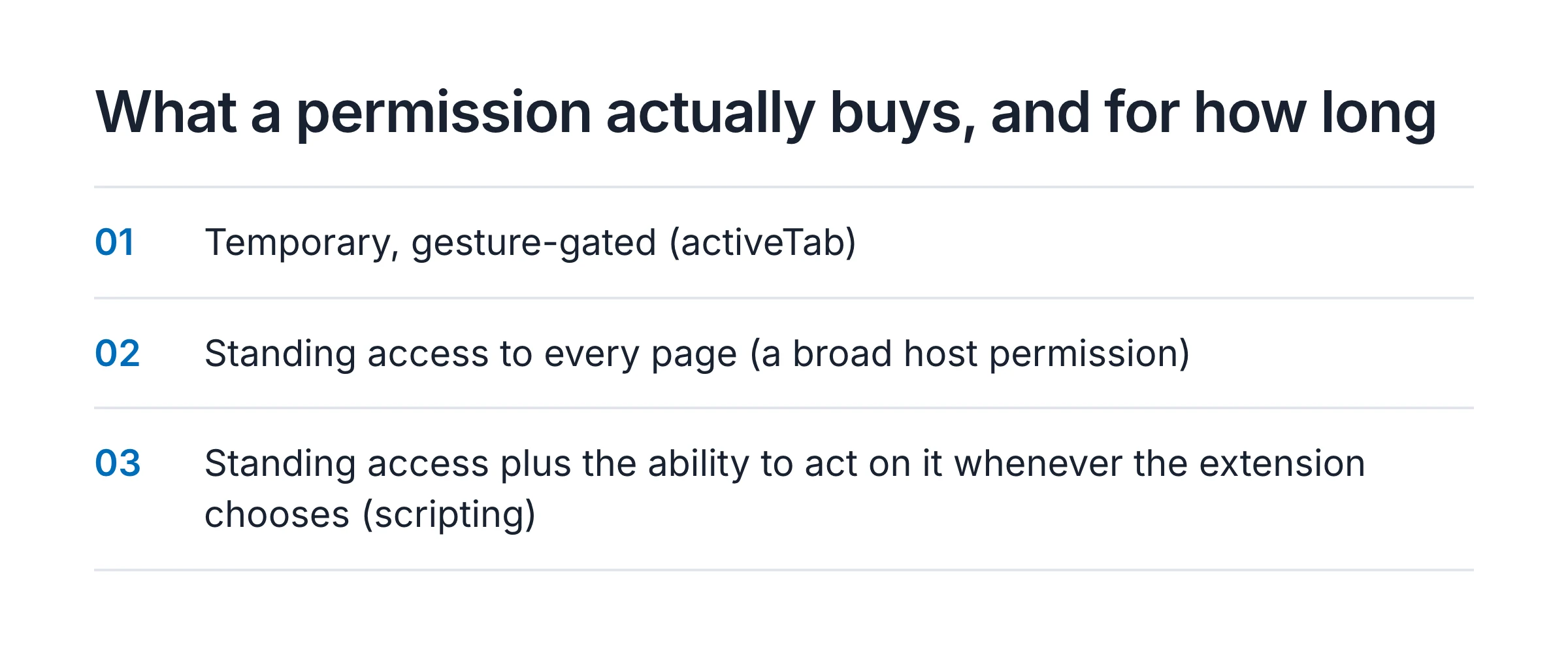
Three shapes of access show up below, and they are not the same size.
Temporary, gesture-gated (activeTab). The browser grants access to the tab you are looking at, only after you click the extension’s own icon or a menu it added, and that access is gone the moment you navigate away.[5] Chrome does not show an install-time warning for it, because there is nothing standing to warn about.
Standing access to every page (a broad host permission). A permission
like <all_urls> is not scoped to a click. It is granted at install and it
stays granted, whether or not you have opened the extension today, until you
remove it. This is the one that earns the broadest install warning Chrome
shows.
Standing access plus the ability to act on it whenever the extension
chooses (scripting). Declared on top of a broad host permission, the
scripting permission lets the extension’s own background code run
injected script on any matching page at any moment it
decides to -
not only when you click something on that page.[6] A statically
declared content script, by contrast, only ever runs the one file named in
the manifest, at the one moment named in the manifest, and cannot be changed
without a new build going through store review.
What Save Image As Type actually asks for
Read from the shipped manifest, not the store’s one-line summary, because
the full breakdown lives on its own page precisely so nobody
has to take a one-line summary’s word for it. On Chrome and Edge: contextMenus,
downloads, activeTab, storage, offscreen, notifications and
clipboardWrite, plus the host permission <all_urls>. Firefox drops
offscreen, which that browser has no API for, and keeps the rest.
The host permission is spent on two things: fetching an image’s bytes past
the page’s own CORS restrictions, and a content script that can see a
right-clicked CSS background-image, <canvas> or <video poster> source,
none of which the browser’s own context-menu API reports. Images live on
domains chosen by the page, not by us, so the set cannot be known in advance.
That content script is declared to load on every page you visit, the
moment the page is ready, whether or not you ever right-click anything on
it. It does nothing until you act, and /permissions/
says so in detail, but the grant itself is not gesture-scoped the way
activeTab is, and it is not injected on demand the way Benoit’s scripting
permission is below. It is a standing script, present on every page, kept
inert by the code rather than by the permission. If you want the permission
itself to be the thing doing the limiting, that is not what ours does, and
readers who care about the difference should know it before they read the
next section.
Three competitors, read the same way
Save Image As… by Peter Benoit
Version 1.1.0 declares contextMenus, downloads, offscreen and
scripting, plus <all_urls>.[1] No storage (settings are not
persisted between sessions) and no statically declared content script - the
scripting permission is how it reaches a page instead, which on paper is
the most standing capability on this list: host access plus the ability to
run code on any matching page whenever the background worker decides to,
not gated to a click. What makes that acceptable in a way it would not be
for a closed extension is that the source is
published, so the claim
that it only ever fires in response to the context menu is not something you
have to take on faith. 149 users at last count.[1]
Save Image As… by Abhishek Badar
Discloses contextMenus, downloads, activeTab and notifications - and
that is the whole list.[2] No <all_urls>, no scripting, no
storage. Every capability it has runs inside a single tab, only after you
have clicked something in it, and is gone when you leave. This is the
narrowest standing footprint of the four, ours included, and it is the one
place a competitor’s access is plainly better than ours: nothing here sits
on your machine reading pages you have not interacted with, because nothing
here is granted until you interact. Its listing states plainly that the
developer has disclosed it will not collect or use your data.[2]
1,000 users.
Save Image As PNG by Music Find
The most installed extension in this comparison by two orders of magnitude, at 100,000 users, and the narrowest in output: PNG only.[3] Its Chrome Web Store listing does not itemize declared permissions the way Badar’s does, so there is no manifest-level list to read here the way there is for the other three. What it does disclose, covered in its own section below, is broader than either.
The comparison table
| Save Image As Type (ours) | Save Image As… (Benoit) | Save Image As… (Badar) | Save Image As PNG (Music Find) | |
|---|---|---|---|---|
<all_urls> host access | Yes | Yes | No | Not itemized |
| Standing content script on every page | Yes | No (on-demand via scripting) | No | Not itemized |
| Can inject code on any page, any time | No (static script only) | Yes (scripting) | No | Not itemized |
storage (settings persisted) | Yes | No | No | Not itemized |
| Source code public | No | Yes | No | No |
| Users | 1,000 | 149 | 1,000 | 100,000 |
Three notes, because a table like this is exactly where a roundup quietly picks a winner without saying so.
“Not itemized” is a finding, not a gap in this article. Music Find’s listing simply does not break its permissions out the way Badar’s does, and that is true of a meaningful share of the category - the itemized view depends on what the developer chose to disclose beyond the legally required minimum, not on what Chrome forces every listing to show.
Broadest-on-paper and narrowest-in-practice are different questions, and this table only answers the first one. Benoit’s extension can technically run code anywhere at any time; its source is also the only one here anyone can check that it does not. Badar’s extension can technically do very little outside a click; whether that is because the developer chose narrowly or because the feature set is smaller is not something a manifest alone tells you.
The row that goes against us is the second one, not the first. Two of us
share <all_urls>. Only ours keeps a script standing on every page rather
than reaching for one on demand.
What the store’s own data disclosure adds
A permission list says what an extension could do. The Chrome Web Store’s separate “Privacy practices” disclosure is the developer’s own statement of what it says it does do, and it is worth reading against the permission list rather than instead of it.
Music Find’s listing for Save Image As PNG discloses Location, User activity and Website content as data types the item collects.[3] None of those three is required just to convert a PNG on your own machine. Chrome requires this disclosure even when the processing is entirely local, so a checked category is not proof the data leaves the device.[4] It is also not nothing: it is the developer’s own statement that these categories apply, on the most-installed extension in this comparison, with no manifest breakdown to check it against and no privacy policy on the listing that explains why a single-format image converter needs to know where you are.
Badar’s listing states the opposite outright: the developer has disclosed it will not collect or use user data at all.[2] Ours sits between the two, and says so specifically rather than in one word: on Chrome and Edge, anonymous usage analytics are on by default and covered in full, covering which format was used and whether the save worked, with a one-click opt-out; the Firefox build ships none of that code at all. Benoit’s listing makes no data-collection claim beyond what its public source already lets you verify directly.
Which permission set should worry you
Not a single answer, because the four of us are not making the same trade.
If a standing footprint on every page you visit is the thing you will not accept from a browser extension, Badar’s build is the one on this list that does not have one - fewer output formats, no quality control, and the narrowest access of the four.
If you want to verify a broad grant rather than trust it, Benoit’s build is the only one here whose code you can actually read, which matters more than its permission list does once you have read it.
Save Image As Type is the pick if what you want is per-format quality control, PDF output and a build that has been through review on Firefox Add-ons and Edge Add-ons rather than side-loaded from one store - and a page that names exactly what its broad permission is spent on rather than leaving you with the browser’s own one-line warning. What we do not have is a narrower footprint than every alternative here, and this article is the place that says so plainly instead of a table that quietly leaves it out.
If a hundred thousand other people using something is the reassurance you were looking for, Save Image As PNG has that, and it is worth reading its data disclosure before installing rather than after.
For the fuller picture beyond permissions alone, the roundup of image converter extensions covers format support and quality controls too, and the two risks an online image converter carries are a different question from anything above: those never ask your browser for a permission at all, because they ask for the file itself. If the WebP file that started this search still will not open anywhere, the WebP problem end to end is the place that actually fixes it.
Sources
- GitHub: peterbenoit/SaveAsExtension, manifest.jsonPrimary source
The exact permissions, host_permissions and incognito value declared by Peter Benoit's Save Image As... extension, version 1.1.0: contextMenus, downloads, offscreen and scripting, host access to <all_urls>, and incognito "split". Read .
- Chrome Web Store: Save Image As... (Abhishek Badar), Privacy practicesPrimary source
The permissions this extension discloses (contextMenus, downloads, activeTab, notifications), its 1,000-user count, and its Privacy practices statement that the developer has disclosed it will not collect or use user data. Read .
- Chrome Web Store: Save Image As PNG (Music Find), Privacy practicesPrimary source
This extension's 100,000-user count and its Privacy practices data collection disclosure, which lists Location, User activity and Website content as data types the item collects. Read .
- Chrome Web Store: User Data FAQPrimary source
That a developer must disclose a data collection category even when data is processed or stored locally on the user's device, so a declared category is not by itself evidence that data left the device.
- Chrome for Developers: The activeTab permissionPrimary source
That activeTab grants temporary access to the current tab only after the user invokes the extension through a direct gesture, that access is revoked on navigation or when the tab closes, and that activeTab does not trigger an install-time host-access warning. Read .
- Chrome for Developers: chrome.scripting APIPrimary source
That the scripting permission, combined with standing host permissions, lets an extension's own background code choose to run injected script or CSS on any matching page at any time it decides to - not only in response to a user gesture on that page. Read .
- 9to5Google: Chrome extension with 1M+ users removed as malwareReporting
That the original Save Image As Type, with at least a million users, was removed from the Chrome Web Store in March 2026 for injecting affiliate codes across 578 sites, which is why a permission a converter merely could abuse is worth reading before installing rather than after. Read .